For the dad
You meant to make pancakes. You meant to lace your kid's shoes. Instead it's 7:42, the bus is leaving, and you're thirty Reels deep with cold coffee.
Alarm + app blocker for iPhone
Your phone is built to keep you scrolling from the moment you wake. Anchor rings until you get up and scan a code in another room, then keeps your feed locked so the first hour goes where you meant it to.
Try it free, then your plan renews. Cancel anytime in Settings.
It was never a fair fight
Every app on your phone has a team whose whole job is to keep you there one more minute. That's who you're up against at 6 a.m., half-asleep, before coffee.
You shouldn't have to win that fight half-asleep. With Anchor, the alarm stops when you scan a code in another room, and by then you're already up.
Inside the app
Pick a time, a scan code, and the apps that lock the moment you're up.
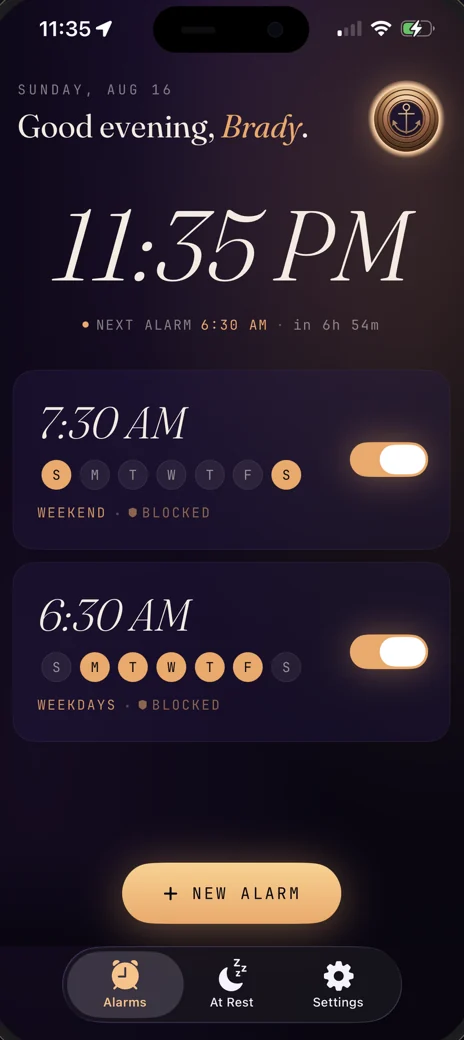
Through Silent and Focus. Tap I'm Up for a sixty-second Quiet Walk to your code. There's no turning it off from the pillow.
A minute of quiet to walk to the kitchen. If you haven't scanned by then, the alarm comes back.
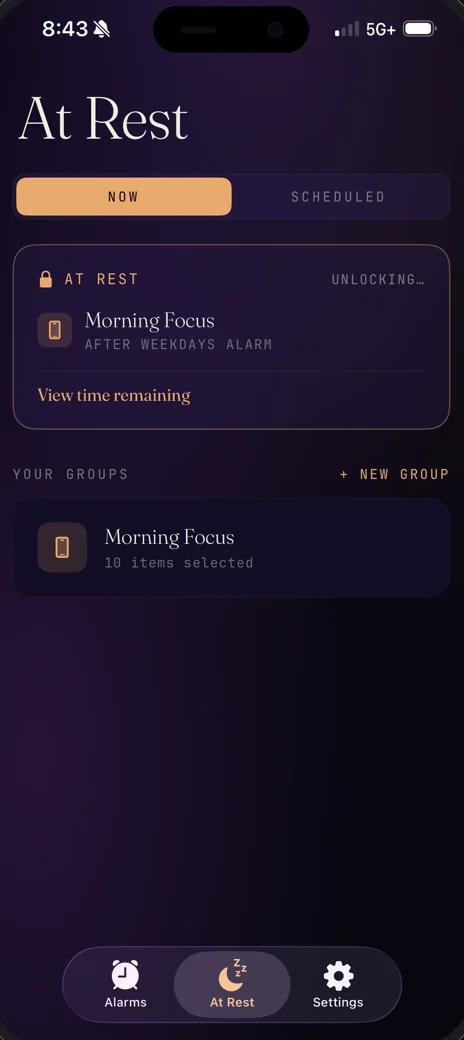
Group the apps that pull at you. Lock them now, on a timer, or on a schedule. Three emergency overrides a month for the days that need one.
Who are you today?
You meant to make pancakes. You meant to lace your kid's shoes. Instead it's 7:42, the bus is leaving, and you're thirty Reels deep with cold coffee.
Nine more minutes, nine more times. Shower skipped. Workout bumped. The day you wanted is gone before your feet hit the floor.
The best thinking comes before the inbox opens. That hour is yours. Don't hand it to the feed.
How it works
Pick a wake time, a barcode, and the apps you want locked. Then go to bed.
It rings through Silent, Focus, and force-quit. It stops when you scan your barcode, QR code, or NFC tag, and not before.
The apps you chose stay locked for as long as you set. Lock them again for dinner, deep work, or bedtime.
Two mornings
Same alarm, same kids, same bus. Anchor changes what happens between 5:47 and 7:42.
I'm Brady Davis. I built Anchor because the first hour of my day kept losing to the feed. It runs on Apple's AlarmKit, nothing you set leaves your phone, and I read every email that comes in at hello@anchormorning.app.
Start free → Set it tonight · $6.99 a month · Cancel anytime
Not ready tonight? Read the setup guide or save the link for later.
App blocker
Pick the apps that pull at you and choose when they lock. Calls and texts always get through. In the app, it's called At Rest.
The moment you scan, the apps you picked lock for as long as you chose, from 15 minutes to 8 hours. The first hour goes where you meant it to.
Good for: the first hour, the school run, the commute.
Lock the apps you picked whenever you need to. Choose to keep them locked until you scan your code, or pick a timer from 15 minutes to 3 hours and they open when the time is up.
Good for: deep work, dinner, a study block.
Set the days and hours once, like weeknights after 9, and the lock turns on by itself every week. You choose whether a scan can end it early or it holds until the time is up.
Good for: work hours, evenings, bedtime.
How strict it is
You set the rules the night before, while your head is clear. Here is what holds in the morning, and what's always there when you really need your phone.
0, 1 or 2 snoozes
Once they're used, the alarm only stops when you scan your code, like the coffee bag in your kitchen. With Quiet Walk on, tapping I'm Up gives you sixty quiet seconds to get there. Don't scan, and it rings again.
Set in Stone
Optional, per alarm. For the two hours before it rings, the alarm can't be edited, turned off, or deleted. Scanning your code still ends it early.
Hardcore Mode
Optional and off by default. While a block is running, apps can't be deleted, Anchor included.
Calls and texts
Anchor only locks the apps you pick. Calls and texts always work, and it never locks the whole phone.
3 overrides a month
An override stops a ringing alarm or opens a block. You get three a month, shared across both and refilled on the 1st, and you can borrow up to three more from next month.
Your choice
Set in Stone, Hardcore Mode, and every block are optional. Use only the rules that help you.
The fine print
Why Anchor
Some alarms get you up. Some tools lock your apps. Anchor does both, with what's already in your house.
| Feature | Anchor | Apple Clock | Alarmy | Unbed |
|---|---|---|---|---|
| Works with what you already own | Yes | Yes | Yes | No (needs their block) |
| Scan to dismiss | Barcode, QR, or NFC | No | Barcode or QR | Their NFC block |
| Built-in app blocker | Yes | No | No | Yes |
| Apps stay locked when you wake | Yes | No | No | Yes |
| Scheduled blocks, any time of day | Yes | No | No | With Unbed+ |
| Limited emergency exit | 3 a month, reset on the 1st | Not applicable | Not applicable | Limited (5 to start) |
| Price | $6.99/mo, $39.99/yr, or $79.99 once | Free | Free + premium | Block $51–55 + optional $39.99/yr |
No hardware needed. Any barcode in your house works.
Compared against each product's own website and App Store listing on September 30, 2026. Products change. Check theirs.
Pricing
On the yearly plan, that's $39.99 for 365 mornings. Every plan unlocks the whole app, with nothing else to buy inside it. Billing and refunds go through Apple.
Try it free, then your plan renews. Cancel anytime in Settings.
Every plan includes
Questions
Read the full FAQ → · Or write to hello@anchormorning.app
Anchor Morning, now on the App Store
Download it tonight, set one alarm, and pick something in your kitchen to scan. Tomorrow it rings until you're up. For iPhone on iOS 26.1 or later.
Not ready tonight? Read the setup guide or save the link for later.
On Android or an older iPhone? Leave your email and we'll send one note if that changes: hello@anchormorning.app.
Optional NFC tag

Reserve · $9.99. Reserve yours with your email. No charge today.